18 Sep 2026·5 min read·Greg Turner
A Free HL7 v2 to FHIR Converter That Runs in Your Browser
Paste an HL7 v2 message, get a FHIR R4 Bundle back. The message never leaves your tab, and the converter tells you what it dropped.
What This Article Covers
- Why online converters are unusable for real HL7 traffic
- How client-side conversion keeps PHI inside your browser
- The 42 segment mappings and message types supported
- Reading the conversion report: dropped fields and unmapped segments
- Documented limits, including partial blood-product and imaging mapping
- When a generic mapper stops being enough for your feed
Who This Article Is For
- Integration engineers working with HL7 v2 feeds
- Health technology teams planning a FHIR migration
- Clinical system vendors evaluating interoperability effort
- Architects scoping the gap between a standard and a site's messages
Introduction
Every healthcare integration project has the same first hour. Someone sends you a sample message, you open it, and you are looking at a wall of pipes and carets that may or may not match what the vendor's spec says it contains. Before you can design anything, you need to know what is actually in the feed.
The obvious move is to paste it into an online converter. In healthcare, that is also the move you cannot make. The sample is rarely as de-identified as someone promised, and pasting it into a third-party service means patient data has left your organisation and landed in someone else's logs. So the tooling gets abandoned and the work goes back to reading segments by hand.
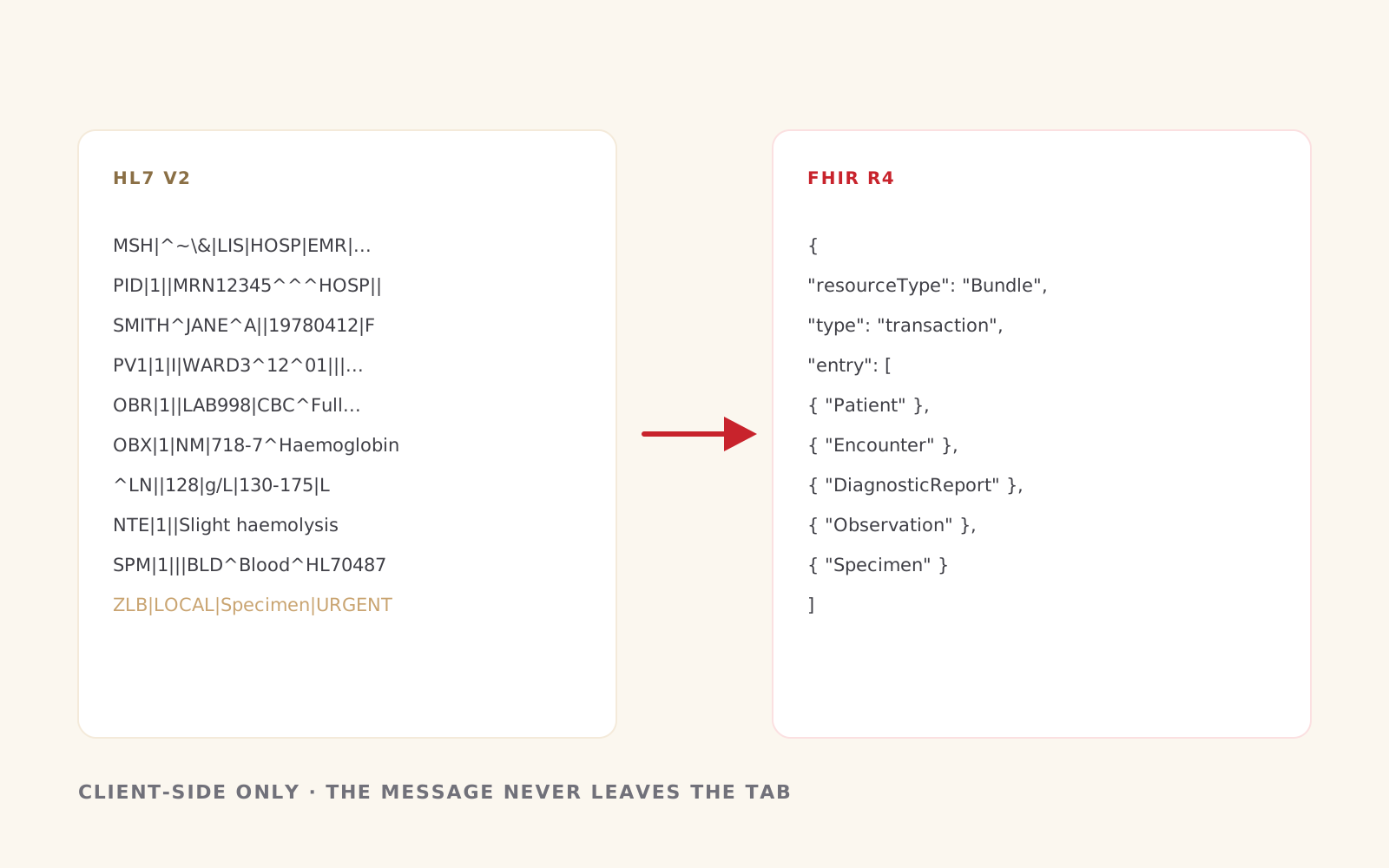
We built a free HL7 v2 to FHIR converter to close that gap. Paste an HL7 v2 message, get a FHIR R4 transaction Bundle back. It is free, there is no signup, and the message never leaves your browser tab.
The Conversion Happens on Your Machine
This is the part that matters most, so it is worth being precise about it. The converter is client-side only. There is no API call, no upload, and no server-side processing step. Parsing and mapping run in JavaScript in the tab you have open, and conversion runs locally as you type.
You do not have to take our word for it. Open DevTools, switch to the Network tab, paste a message, and watch. Nothing leaves.
That design has a practical consequence for how you can use it. You can paste a live message from a production feed, with real identifiers still in it, and evaluate the mapping without raising a privacy incident. The only time anything is transmitted is if you choose to send us a note through the contact form, and that form carries your name, your email and your note. No HL7 or FHIR payload is included.
What It Actually Converts
The converter implements 42 segment mappings against the HL7 v2-to-FHIR Implementation Guide, covering the message types that make up most real-world traffic:
- ADT — A01, A02, A03, A04, A05, A08 and A40, plus other ADT events that reuse the same segments
- ORU — results, including SN, ED and TX repeats
- ORM and the OM* family — OML, OMI, OMD, OMP and OMG orders
- SIU — scheduling, both bookings and cancellations
- MDM — documents, including Base64 PDF attachments
- VXU, RDE, RAS and RDS — immunisations and pharmacy
- DFT, BAR and PPR — financial transactions and problem lists
- ACK and QBP — acknowledgement and query control messages
On the FHIR side that produces Patient, Encounter, Observation, DiagnosticReport, ServiceRequest, MedicationRequest, MedicationDispense, MedicationAdministration, Immunization, Condition, Procedure, AllergyIntolerance, Specimen, Appointment, DocumentReference, Coverage, ChargeItem, RelatedPerson, PractitionerRole, Provenance, MessageHeader and OperationOutcome, assembled into a transaction Bundle you can download.
It also handles the awkward edges that generic mappers usually skip. PID-2 and PID-4 were withdrawn from the standard after v2.7, and messages in the wild still carry them, so both are mapped to Patient.identifier rather than discarded. An A40 merge produces a second Patient for the prior identifiers, with the surviving Patient linking to it as replaces. Z-segments are surfaced rather than silently dropped.
If you do not have a message to hand, there is a library of sample messages covering each supported type, drawn from realistic cases rather than textbook examples.
The Conversion Report Is the Actual Product
Any converter can produce output. The question a healthcare integrator needs answered is what the converter did not do, and most tools are quiet about that.
Every conversion here comes with a report listing dropped fields, unmapped segments and warnings. When a field has no standard target, it says so in plain terms: "Equipment instance identifier has no standard Observation target in v1", or "Last update facility has no standard Patient target". When a message type is only partially covered, it tells you before you find out in testing. Blood-product messages are only partially mapped. OMI imaging orders reuse the ORM maps and may leave ImagingStudy-specific segments unmapped. OML may leave Specimen-specific groups unmapped.
That report is how you find out in five minutes whether a generic mapping gets you 90% of the way or 40%, which is the decision you are actually trying to make.
What It Will Not Do
Being straight about the limits is part of the point.
It is not for clinical use. Output should be reviewed before production use, and it comes with no warranty. It converts one message at a time, so an HL7 batch beginning with FHS or BHS will be refused with a note asking for a single message starting with MSH. It reads HL7 v2 only, so CDA and other XML are rejected with an explanation rather than a stack trace. And it targets FHIR R4.
Most importantly, it is a generic mapper. It maps the standard, not your site. If your messages carry local codes, site-specific Z-segments, or a vendor's interpretation of a field that differs from the Implementation Guide, a generic mapper will get the shape right and the details wrong.
Where the Generic Mapping Ends
In three years of healthcare interoperability work, including HL7-compliant FHIR APIs adopted across multiple client teams and the integration of Medicare Web Services and My Health Record into the Gentu patient management system, we have not once seen a feed that a generic mapper handled completely.
That is not a failure of the mappers. It is the nature of HL7 v2: a standard with enough optionality that two conformant systems can disagree about the same field. If your messages do not fit a generic mapper, that is the normal case, and it is what we get hired for.
So treat the browser tool as the start. It will tell you what the standard mapping gives you and where your feed diverges from it. If what you need after that is an API, or a mapping built for your site's actual quirks, tell us what your feed looks like and we will tell you what it takes.
Related reading:
Conclusion
The HL7 v2 to FHIR converter is free and open in a browser tab. Paste a message, read the report, and check the Network tab while you do. It will tell you in a few minutes what the standard mapping covers and where your feed starts to diverge.
If the answer turns out to be that your messages need a mapping of their own, contact us and tell us what the feed looks like.
Working through something like this?
A short description of the problem is enough to start.